Week 1
Map your billing.
- YouShare pricing rules and sample invoices
- YouProvide access to operational and cost data
- WeMap billable events, costs, surcharges and exceptions
Billr takes session data from your charge point management system and your roaming partners, prices each session against the customer's or fleet's tariff, keeps the energy and roaming cost next to it, and hands finance invoice-ready lines.
Book 30 minutesA 30-minute call about your billing. Free, no contract, no obligation.
The same month for a charge point operator, with and without Billr.
 Without Billr Without Billr |  With Billr With Billr | |
|---|---|---|
| Tariffs | One price per connector in the platform | Per site, contract, fleet and roaming partner |
| Energy price change | Tariffs reviewed once a year | Cost updated from that date, margin per site visible |
| Roaming records | Matched to customers by hand, weeks later | Priced at the partner tariff, cost recorded next to it |
| Fleet customers | Session lists emailed on request | One invoice per fleet with every session attached |
| Month-end | Exports from the platform and the roaming hubs | Invoice lines per customer, fleet and partner |
| Disputes | After the invoice went out | Exceptions reviewed before the run is approved |
AI assistant
Copy one page from Billr into Claude, ChatGPT, Cursor or any assistant that can call an API. From then on it reads your customers, charges, price lists, bills and analytics directly, with the permissions of your own user.
Which sites were below 10 % margin last month?
Three of 27 sites. Two are on the old public tariff, one has a fleet contract with a flat kWh price from 2024:
| Site | kWh | Margin |
|---|---|---|
| Linz Nord | 18,420 | 4.1 % |
| Graz Hauptbahnhof | 22,870 | 6.8 % |
| Wels Depot (fleet) | 41,300 | 8.9 % |
Source: Billr analytics, energy cost and revenue by site, last month
How many roaming sessions from partner X are still unpriced?
214 sessions from 1 to 12 October, 3,980 kWh. 190 are waiting for the partner's CDR, 24 have a CDR but no matching tariff for the DC chargers in Villach. The reason is listed on each one.
Source: Billr usages filtered by partner and status
Prepare a new fleet tariff for Wels Depot at cost plus 15 % from 1 January.
Draft price list "Wels Depot 2027" is ready in Billr, energy at cost plus 15 % recalculated from your October electricity price, idle fee unchanged, valid from 1 January. Review and publish when ready.
Billr sits next to your charging platform, prices every session against the right tariff, and shows you energy and roaming cost on each one.
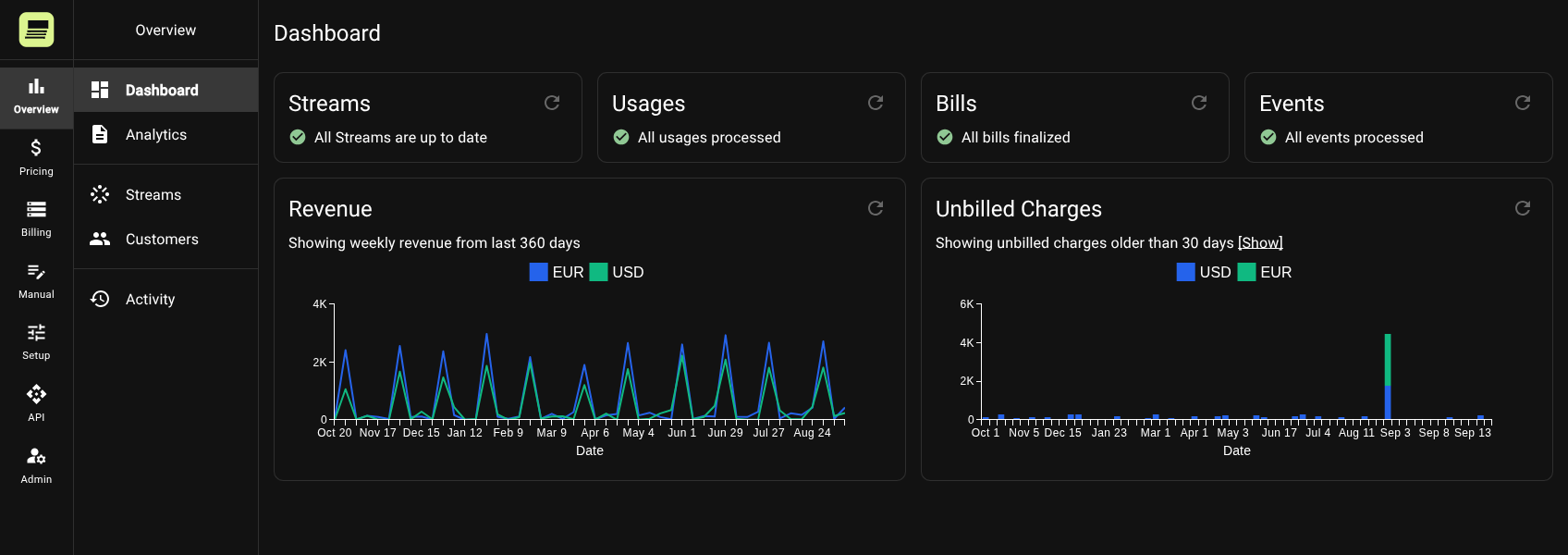
Sessions arrive from your charge point management system as exports, API events or roaming CDRs. Billr prices each one by site, connector, energy, duration, idle time and the customer's contract within minutes, and shows you where the platform's price does not match your tariff.
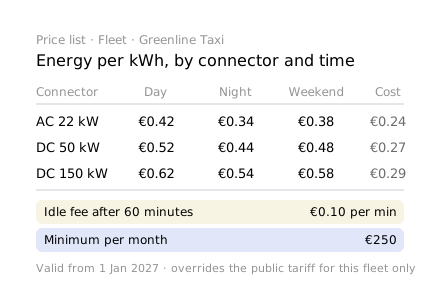
Billr keeps what the session cost you in energy or in roaming fees and what you charged for it. Margin per site, contract and roaming partner, so you reprice before the next quarter instead of after it.
Monthly minimums, volume tiers, dedicated connectors, a separate price for depot charging. Each contract is configured in Billr, not negotiated into the platform's tariff model.
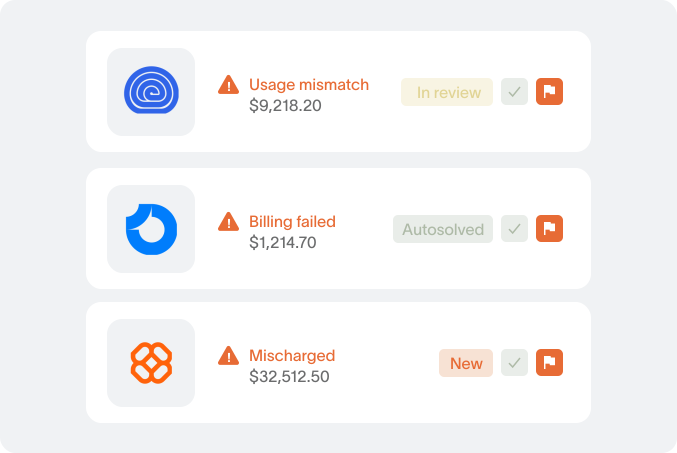
A session sent twice is recorded once. A session without a matching tariff is flagged with the reason. Late roaming records are priced into the next period, and nothing reaches an invoice before you have seen the exceptions.
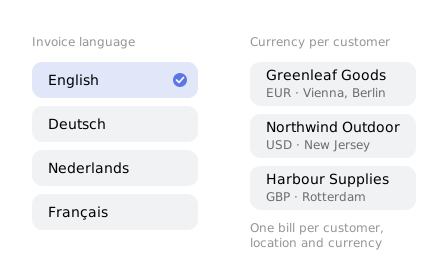
Fleet customers get one monthly invoice across all sites and drivers. Each roaming partner gets one statement with every session listed, so disputes are settled before you send it, not after.
Each invoice carries a line-by-line report with every session, its price and its components. Fleet managers stop asking for session lists, and disputes get shorter.
Billr works from the session data your platform already records.
| Your systems send | Billr returns |
|---|---|
| A session: connector, kWh, start, end, customer or card | A priced line with energy, time and idle components, cost and margin |
| A roaming record from a partner | Priced at the partner's agreed tariff, partner cost recorded next to it |
| A new electricity price | Cost updated from that date, tariffs repriced by rule |
| A fleet contract with a monthly minimum | Minimum applied, overage priced, one invoice per fleet |
| A CDR priced by the platform | Re-rated against your tariff, the difference flagged |
| Month-end | Invoice lines per customer, fleet and roaming partner |
Billing shouldn’t take you months to implement
Week 1
Week 2–3
Week 4
Controls
Billing software is judged on the month it goes wrong. These are the rules Billr enforces so that month does not happen.
Send an event as often as you like. Billr stores it once under its ID, keeps its order or session reference, and it can only ever be billed once.
A run does not start until every data source has delivered up to the period end and no errors are waiting. Nothing goes out until you approve it.
Numbers are assigned when a bill is finalised, in sequence, one bill per customer, location and currency. No holes to explain to the auditor.
A credit reverses the revenue, with or without the cost. A corrected event credits the old charges and bills new ones. The originals stay.
After a price change, see the difference per customer for a selection or a whole period before anything is applied.
Field-level history on prices, price lists, mappings and overrides, plus who started and who approved every billing run.
Every customer runs in its own environment in the EU (AWS Ireland), with its own database, its own users and invite-only access.
No. It keeps running the chargers and the sessions. Billr reads the session data from it and prices it against the contracts.
Session records with connector, energy, start and end time and the identifier of the customer, card or fleet, from your platform's export, API or roaming records.
Yes. Sessions from roaming drivers are priced at the partner's agreed tariff and invoiced to the partner, with your own cost next to them.
About four weeks. Week one we map your tariffs and a month of sessions, weeks two and three we configure and run Billr next to your current billing, week four you invoice real customers with it.
Your team, in Billr, from a date you choose, per site, per contract or for everyone at once.
The first step
You do not need a project, a budget or a decision to find out what Billr would change for you. You need half an hour.
You show us how you bill today: your systems, your price lists, where the month goes wrong. We tell you on the call what Billr would do with it, and what it would not.
One customer, one month: send us the invoice and the data behind it. You get it back priced in Billr, matched against your invoice, with the breakdown behind every line and the analytics on top: volumes, revenue, margin.
A short document: what matched, what differed and why, what we found in the numbers, and what a setup would involve. No contract, nothing to install, nothing to prepare.
If you do not like what you see, you say no. That is the whole risk.